Tag Archives: diy project

MiniArcade Machine—From Paper Model to Retro Arcade Machine

Loading

Some projects arise from a spontaneous idea, while others develop over months. Our mini arcade machine definitely belongs to the second category. It all started on a cold winter day when my son and I sat down at the kitchen table to start another little craft project. At the time, we had no idea that a simple paper model would eventually turn into a working mini arcade machine. But that’s exactly what happened—and in this post, I’d like to take you step by step through how we implemented this project.

The inspiration: a paper arcade machine
The idea to build a mini arcade machine came to us quite spontaneously. A few years ago, I built a tabletop or bartop arcade machine, which my son regularly monopolizes and plays with. At some point, he got a very small “mini arcade machine” (which you can buy in the Far East for less than 10 euros). However, due to its very small dimensions and screen size of just under 5 cm, it only provides short-lived enjoyment. The quality of the pre-installed games is also somewhat borderline. As he was playing with the little thing again, he asked, “Can we make something like this out of paper?” Of course we could! So we found an old shipping box that was left over from a delivery from a large online retailer and began to draw the first designs.

Step 1: Sketches and planning
Using a ruler and pencil, we drew the outline of the machine directly onto the cardboard. We based our design on the dimensions of the small arcade machine: a display tilted slightly backward, a wide base, and a front panel with space for buttons and levers. The proportions were simply scaled up… My son had to take measurements and put the multiplication skills he had learned at school into practice…

Step 2: Cutting out and gluing together
We cut out the individual pieces using a ruler and a carpet knife. This wasn’t as easy as it sounded, because the cardboard was thicker than we had expected and we wanted the edges to be as clean as possible. Once all the pieces had been cut out, we glued them together using hot melt adhesive. Hot melt adhesive was ideal because it cools quickly and creates a strong bond.

the cut-out cardboard pieces
and that’s how they are arranged
The parts are glued together with hot melt adhesive.

The finished paper machine looked pretty good, but it was still a little boring. So he painted it with his felt-tip pens and gave it a classic black design. For the buttons and levers, he made small paper knobs, which he glued to the front panel. The result was a small but detailed arcade machine made of paper.

the finished, glued-together paper arcade
the almost finished painted paper model

The idea grows: From a paper model to a functional machine
The paper model was a huge success, and we had fun making it. But at some point, I had an idea: What if we built the whole thing out of wood and equipped it with real buttons, a screen, and a small computer, such as an old Raspberry PI? That way, he could have a nice arcade machine and actually play on it. The slower days of summer vacation were perfect for this, so we began planning the construction of a real mini arcade machine.

Material selection: MDF boards and laser cutter
For the construction of the vending machine, I opted for MDF boards with a thickness of 6 mm. MDF is an ideal material for such projects: it is stable, easy to work with, and has a smooth surface that is easy to paint. It is also relatively inexpensive, which is of course a big advantage for a hobby project.

Step 1: Digitizing the sketches
The sketches of the paper vending machine served as a template for the wooden construction. I drew the designs using Inkscape software and adapted them to the dimensions of the MDF boards. I made sure that the proportions were correct and that the individual parts would fit together well later on. The final dimensions of the machine were to be approximately 25 x 30 cm—small enough to be handy, but large enough to convey an authentic arcade feel.

Inkscape files imported into the laser cutter

Step 2: Cutting with the laser cutter
The next step was to cut the MDF boards to size. A laser cutter was used for this, which was able to cut the parts with high precision. The ability to cut grooves into the boards was particularly useful here: these grooves made it possible to assemble and glue the parts together at right angles with a precise fit later on.

the laser cutter at work

Once all the parts had been cut out, I began assembling them. First, I checked that the individual parts fit together. Thanks to the precision work of the laser cutter, everything fit together perfectly. The grooves made assembly much easier, as they held the panels in the correct position while the glue dried.

everything fits together
The control panel will also be operable.

Step 3: Painting
Once the “shell” was complete, it was time to start painting. I opted for black acrylic paint to give the machine a more professional finish. The smooth surface of the MDF boards was ideal for painting, and after two coats, the machine looked almost like a miniature version of a real arcade machine.

The front glass that protects the LCD screen is made of acrylic glass. In order to paint the edge of the protective cover evenly black, the protective film on the acrylic glass is removed from the edge area. The exposed edge area of the acrylic glass is then painted black to achieve a clean and uniform appearance.

Cutting out the protective film from the acrylic glass to mask the frame

The front glass that protects the LCD screen is made of acrylic glass. In order to be able to paint the edge of the protective cover evenly black, the protective film on the acrylic glass is removed around the edges. The exposed edge area of the acrylic glass is then painted black to achieve a clean and uniform appearance. Gradually, the housing took shape and it was time to install the technical components.

The structure is slowly taking shape.

The heart of the interior is an old Raspberry PI 3 with a Retropie SD card image. For operation and control, I opted for colored push buttons with a diameter of 16 mm. Ten of these are located on the control panel. There is one button on each of the left and right sides. For convenience and cost reasons, I did not build my own controller for the Raspberry’s button operation, but used a ready-made USB-HID controller that only cost a few euros. The screen is a 5-inch 800×600 pixel LC display, and to make the Raspberry’s PCM sound output audible on a small speaker, I used a ready-made “super low-cost” Class D amplifier board.

The inner edges of the monitor frame must be blackened to prevent reflections in the acrylic panel later on.

Once all the housing parts had been painted and all the components for the interior had been prepared, we finally began assembly. Since all the housing parts are glued together but the technology must of course remain accessible, we planned an inspection door on the rear…

Keypad with colors chosen by Junior
The HID key controller finds its place
The screen with the Raspberry PI is
All components are now fully installed.

Now all that’s missing is the inspection cover on the back. To get rid of the waste heat from the Raspberry Pi, we cut a few ventilation slots into the cover. (Or, to be more precise, the laser cut them 🙂 )

Cover on the back

A 5V / 20W power supply unit is used to supply power, which is plugged into a power supply socket on the rear. It supplies all components (Raspberry, audio amplifier, and monitor).

Here is an overview of the technology used:

  • Raspberry Pi 3 with 32GB SD card
  • 5-inch LCD screen: Waveshare 5-inch 800×480
  • HID controller: USB noname joystick controller (online retailer)
  • Buttons: 16 mm momentary push buttons (set of 30 from online retailer)
  • Audio amplifier: DollaTek 3W DC 5V PAM8403 (online retailer)
  • Power supply: 5V/20W power adapter


from paper model to playable MiniArcade

Since I can’t think of anything sensible to write at the end of this blog post, the AI did some thinking for me and generated the following paragraph:

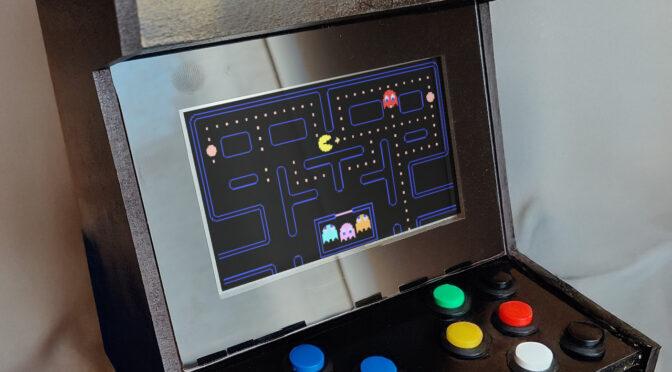
After weeks of hard work, the moment had finally arrived: the mini arcade machine was finished. With its black casing, colorful buttons, and small screen, it not only looks like a real arcade machine, but also plays like one. My son was thrilled—and so was I. It’s a project that not only gave us a lot of fun, but also shows how a simple idea can turn into something great.


Conclusion:
Sometimes it doesn’t take much to create something special: a little cardboard, a few MDF boards, and a large dose of enthusiasm. Our mini arcade machine is the best proof that crafting can be not only creative, but also incredibly fulfilling. Who knows, maybe this is the beginning of a whole series of mini projects? 🙂